UIST 2026 · HAPTICS
A Pen That Follows The Shape Of The Ground
Prof. Eyal Ofek
University of Birmingham. UK
Aug 2026
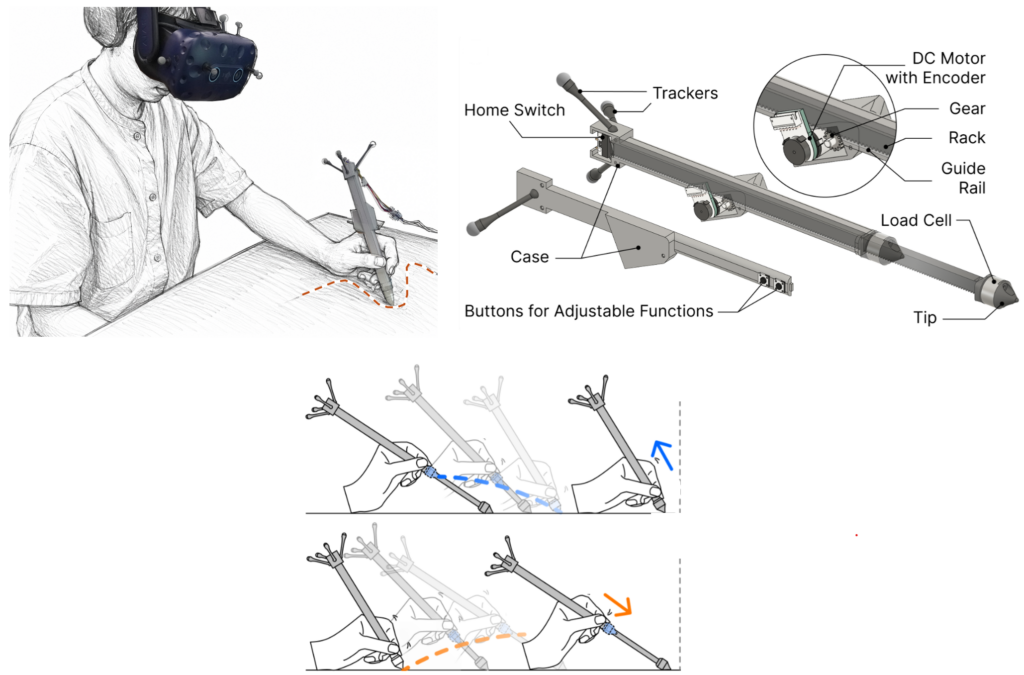
Try drawing a circle in the air, with nothing to rest your hand on. Now try drawing that same circle on a sheet of paper. The second one is easier, straighter, and far less tiring — your hand is supported by the table under the paper, and fine dexterity of the hand fingers can point the pen’s tip with high accuracy. Second, the surface gives the hand something to push against, and the friction with the paper absorbs the small tremors.
While drawing in space is intuitive and uses the user’s natural motions, shaky strokes, misjudged depth, and hand fatigue lead most 3D content creators, from CAD users to animators, to use two-dimensional input tools, such as mice and styluses, to model and sketch three-dimensional objects. These tools enable long periods of work with a hand supported by the tables, yet they require more operations to specify locations and shapes in three dimensions.
A Pen That Changes Its Own Length
A team spanning the Southern University of Science and Technology and the University of Birmingham has been asking whether an input device may enable designers and modelers the freedom to express three-dimensional geometry naturally using their hand dexterity yet enjoy the accuracy of writing on a surface and the support of their hands for lengthy work sessions. Their paper, “MagicPen: Enabling Dynamic Physical Scaffolding through Haptic Feedback for 3D Content Creation in VR with a Variable-length Stylus,” will appear at UIST 2026 in Detroit.
MagicPen looks and feels like an ordinary stylus, but its body isn’t fixed. A small gear-rack mechanism, driven by a DC motor, lets the pen extend and retract by up to 70 mm while its tip stays in constant contact with a real desk. As the user’s hand rises and falls, the pen’s length adjusts to keep that contact alive — so the hand always has something to lean on., even when the virtual geometry it’s tracing floats well above the tabletop.
Sliding the MagicPen along a tablet, the pen can lengthen or retract… The user can interpret the pen’s changing length as if its tip is rising in the air above the tablet or penetrating the tablet to reach a 3D point.
Two Ways of Being Grounded
Sliding the MagicPen along a tablet, the pen can lengthen or retract as its tip is supposed to lie on a virtual geometry. The user, used to fixed-length styluses, can interpret the lengthening of the pen as if its tip is rising above the tablet to reach a point in the air (See figure). Such semantics is enhanced by a visual display of the pen relative to the geometry, either on a screen or in a near-eye display such as smart glasses or a Mixed Reality headset. Similarly, shortening the pen can be interpreted as the tip penetrating the tablet surface and reaching a point below the tablet’s height.
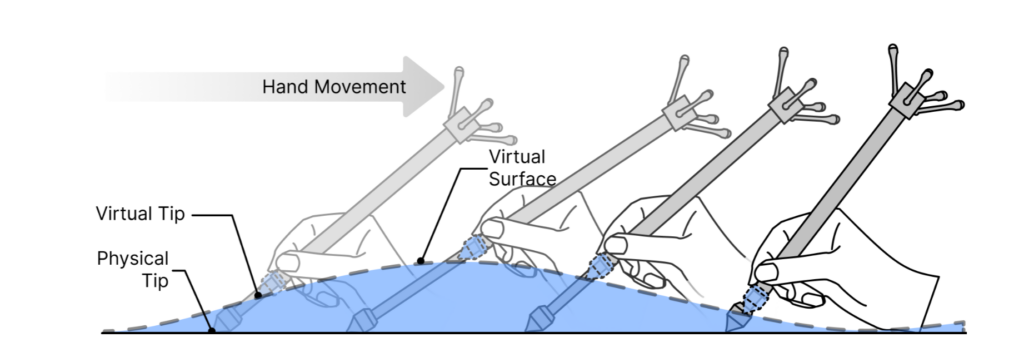
This rendering of an existing geometry is called rigid scaffolding. However, the Magic Pen can do much more than haptically render the geometry of an existing surface. When the user presses a button, the pen behaves like a mouse, dragging the surface point with its motion. Pressing the pen down will shorten the pen and, with it, drag the surface point deeper, while pressing the button and pulling the pen back will pull the surface point upward. This is Dynamic Physical Scaffolding.
Applications in three-dimensional modeling
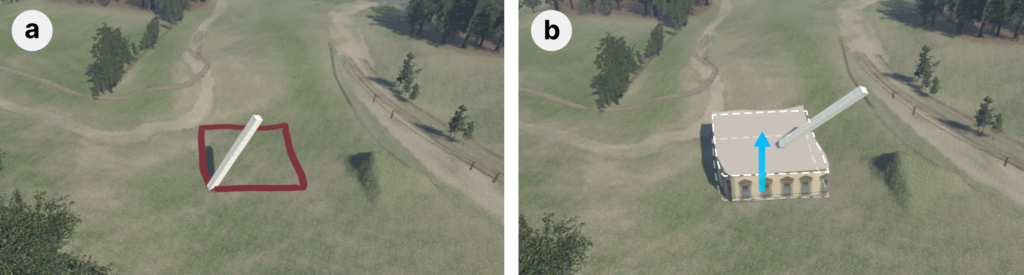
To show pen usage, a simple virtual reality world-building application is used: a village on a rolling landscape. A user sketches a building footprint on the ground. The pen length follows the shape of the ground as the user draws, enabling both a visual and haptic sense of the curved ground. The user uses the pen to select the center of the footprint and presses the pen’s drag button, while the pen’s tip is lifted, pulling an extruded building to the set height (See Figure 3).
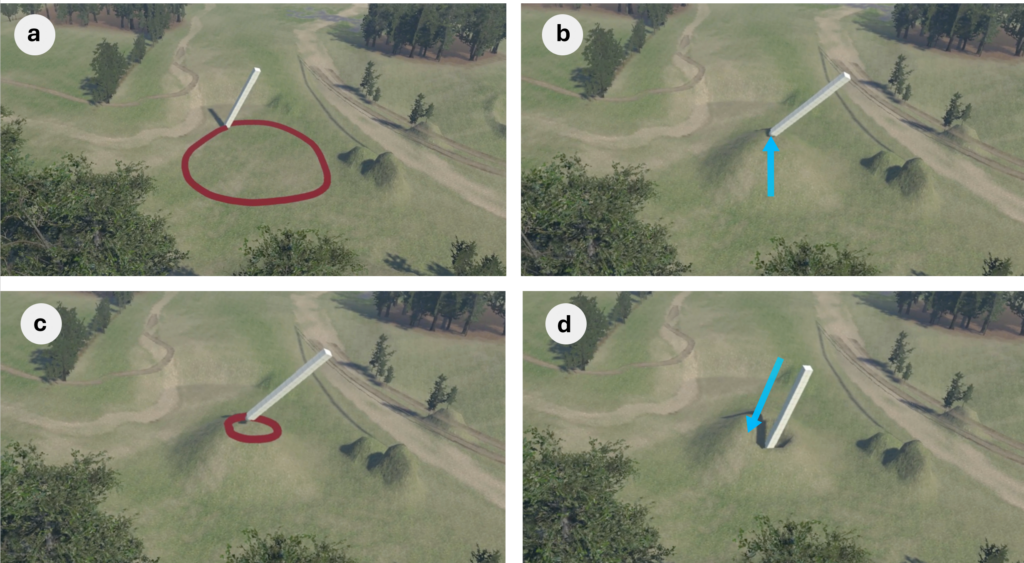
Figure 4 shows the use of the MagicPen to edit the terrain. The user can define an area of deformation by drawing a curve on the terrain (a & c) and then use the edit button to select a point on the terrain and drag it up or down by lifting the pen tip up or pushing the pen down while pressing the button (b & d). The ability to change the effects of the editing from pulling to pushing—all without switching tools – gives the user freedom to express geometry using continuous motions.
The research team sees the simplicity and usability of the MagicPen as a superset of current 2D styluses, adding 3D capabilities while still using natural gestures, and with the user’s hand being supported by the tablet.
Past Research Blog Entries:
How can we avoid hitting objects we can’t see? Belt & Whistles – CHI 2026 – Apr 2026