SUI 2026
Typing without anyone knowing you’re typing
Prof. Eyal Ofek
University of Birmingham. UK
Aug 2026
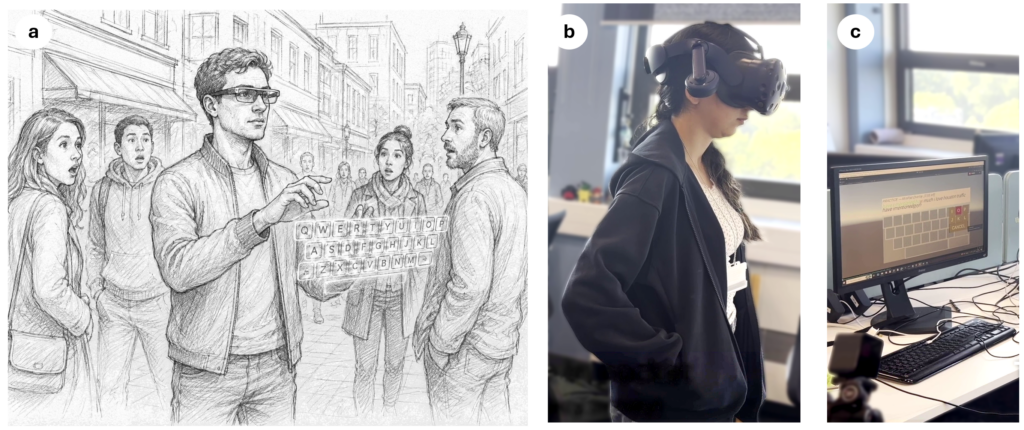
Picture yourself in a meeting, or on a train, or standing at a bus stop, wearing a pair of smart glasses. You want to jot down a note, answer a message, search for something — but you don’t want to wave your hands in the air in front of everyone, and you don’t want your neighbor reading your text entry over your shoulder (Figure 1 (a)). You’d like to type quietly, with small motions, unnoticed (Figure 1 (b)).
This is exactly the gap our latest work sets out to close.
The Trouble With Typing in Public
Smart glasses are gradually becoming consumer devices, enabling ad hoc access to AI agents, the internet, or capturing images and videos. While most interaction is aimed at using speech entry, this input modality is public and can be used in many public settings. While text entry is common as an input modality on computers and phones, it remains one of their weakest links. Most current solutions put a virtual keyboard in front of you and ask you to reach out and tap keys in mid-air or track your eyes and confirm a selection with a pinch gesture. Both approaches work, but both also broadcast to everyone nearby exactly what you’re doing — and often, if they’re paying attention, what you’re typing.
Gaze is Fast, But It’s also a Liar
Eye gaze has always been an appealing shortcut for text entry. Eye movements are quick, and in principle you should be able to just look at the letter you want. The catch is that gaze is noisy — jitter, calibration drift, and the eye’s natural habit of darting around all make it hard to know, character by character, exactly which key someone meant.
There’s a second, sneakier cost to most gaze keyboards: they show you your own gaze, live, as a moving highlight on the keyboard. It seems like a helpful bit of feedback, but it invites users to consciously steer their eyes toward a target — which is a strange, effortful thing to ask your eyes to do, and is exhausting to do for a long period of time.
Finally, Gaze must be accompanied by a selection action. A common action, as used by Apple Vision Pro and other gaze-based systems, is a pinch gesture with a hand held in the air in front of the smart glasses’ camera. This gesture is both public and requires holding the hand in the air during the period of typing.
Look, Then Slide
Researchers at the University of Birmingham in collaboration with Cambridge University designed a technique they call Implicit Gaze+Slide, to appear at ACM SUI 2026 in Bari, Italy.
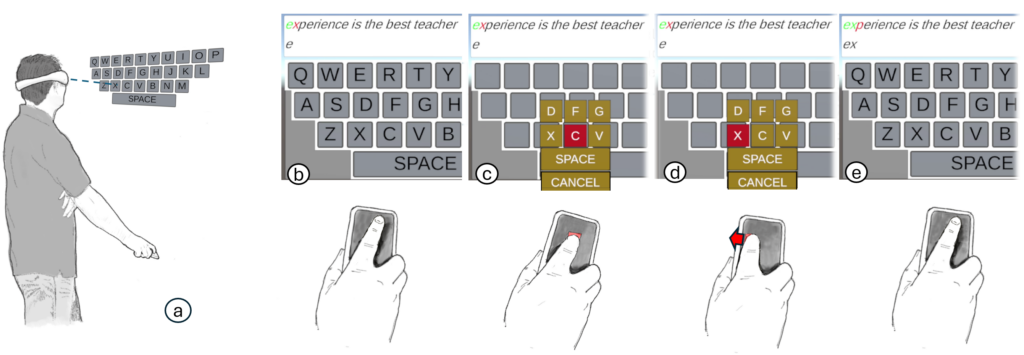
The idea is disarmingly simple. You look at the general area of the key you want on a virtual QWERTY keyboard — but critically, the system never shows you where it thinks your gaze is. There’s no cursor to chase, no highlighted key nudging you to correct your gaze. Instead, the moment you touch a phone held in your hand (or tucked in your pocket), the system silently samples your gaze once and reveals a small 3×3 palette of candidate keys centered on wherever you were looking. A short slide of your finger across the phone’s surface nudges the selection to the correct neighbor, and lifting your finger commits the letter.
From that point on, gaze is out of the picture entirely — the rest of the selection is handled by a small, deterministic finger motion that a bystander would barely register.
One of the nicer aspects of this approach is how little new hardware it demands. There’s no dedicated ring, no thimble, no bespoke sensor — just a phone, something almost everyone already carries, and a keyboard layout everyone already knows how to type on.
Why Hiding the Gaze Cursor Matters
When people can see a gaze cursor drifting across a keyboard, they instinctively try to steer their eyes toward the target — fighting the natural,saccades of their eyes. That fight is tiring, and it doesn’t even work particularly well, since eyes aren’t built to be a precise pointing device.
By treating gaze as a one-shot, invisible “prior” — just enough to narrow things down to a neighborhood of nine keys — the system asks the eyes to do only what they’re naturally good at, and hands the fiddly, precise part of the job to the finger, which is well suited to it.
Does It Work?
The researchers ran a controlled study comparing Implicit Gaze+Slide with an explicit (visible) gaze technique in which the key closest to the user’s gaze was continuously highlighted and confirmed with a key press. Similar techniques are used by existing headsets that include eye gaze tracking.
The results were a bit of a surprise. Implicit Gaze+Slide was expected to be slower, since it adds to the gaze selection a manual refinement step — but it came in statistically indistinguishable in speed from the explicit baseline, at 11.51 words per minute versus 12.54 wpm. Where it pulled ahead was accuracy: a character error rate of 5.49%, against 9.38% for explicit gaze — nearly half the errors. Participants also rated it significantly lower in physical and mental demand on the NASA-TLX workload scale and reported feeling they performed better with it.
Does It Actually Feel Private?
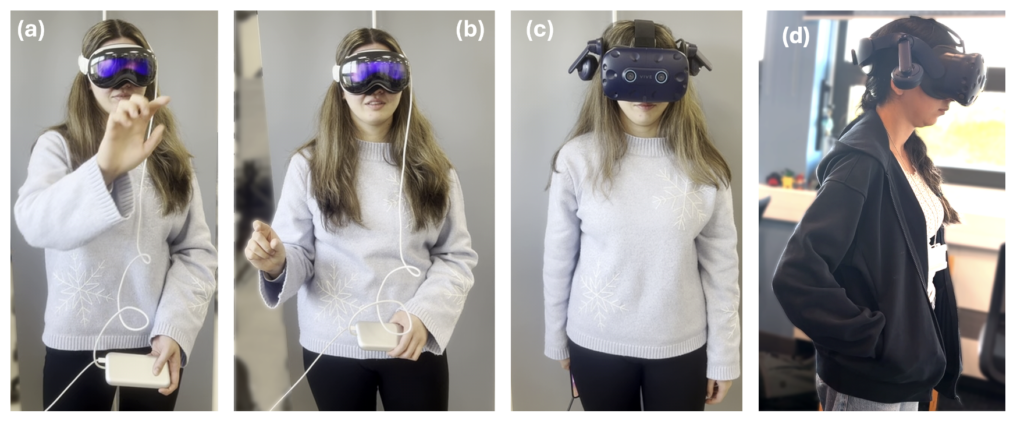
IMPLICIT-GAZE+SLIDE (d) An in-pocket IMPLICIT-GAZE+SLIDE demo (not used in the privacy survey)
Watching someone’s fingers move in the air still gives away that they’re “typing out loud,” even when their eyes are doing the real work
Speed and accuracy were only half the motivation — the other half was whether people would actually trust this to be discreet. In a separate survey, fifteen participants watched side-by-side videos of three typing techniques as seen by a bystander: tapping a virtual keyboard mid-air, gazing and using hand pinch to select the key, and the proposed Implicit Gaze+Slide with the phone held behind the back of the person (later we tested the technique also with a phone in the pocket for better privacy, but this method was not surveyd.). Rated for perceived privacy on a 7-point scale, Implicit Gaze+Slide came out clearly on top at 6.27, ahead of gaze-and-pinch at 4.93 and mid-air tapping at 3.07. As one participant put it, watching someone’s fingers move in the air still gives away that they’re “typing out loud,” even when their eyes are doing the real work.
The team hopes that future smart glasses will be ubiquitous and will enable people to access data and to work anywhere. Thinking about the social impact of using such glasses is an important step in making such technology useful and acceptable.
Implicit Gaze + Slide paper.
Past Research Blog Entries:
How can we avoid hitting objects we can’t see? Belt & Whistles – CHI 2026 – Apr 2026
A Pen That Follows The Shape Of The Ground – Aug 2026
Why a resistance at the elbow might be all your brain needs to better understand the world